Wednesday, October 17, 2012

EMF Compare scalability - take two

Exactly one year ago, I published here the results of the measuring and enhancing of EMF Compare 1.3 scalability in which I detailed how we greatly improved the comparison times, and how we had observed that EMF Compare was a glutton in terms of memory usage. At the time, we did isolate a number of improvement axes... And they were part of what made us go forward to a new major version, EMF Compare 2.0.

Now that 2.0 is out of the oven, and that we are rid of the 1.* stream limitations, it was time to move on to the next step and make sure we could scale to millions! We continued the work started last year as part of the modeling platform working group on the support for logical resources in EMF Compare.

The main problem was that EMF Compare needed to load two (or three, for comparisons with VCSs) times the whole logical model to compare. For large models, that quickly reached up to huge amount of required heap space. The idea was to be able to determine beforehand which of the fragments really needed to be loaded : if a model is composed of 1000 fragments, and only 3 out of this thousand have changed, it is a huge waste of time and memory to load the 997 others.

To this end, we tried with EMF Compare 1.3 to make use of Eclipse Team's "logical model" APIs. This was promising (as shown in last year's post about our performances then), but limited since the good behavior of this API depends on the VCS providers to properly use them. In EMF Compare 2, we decided on circumventing this limitation by using our own implementation of a logical model support (see the wiki for more on that).

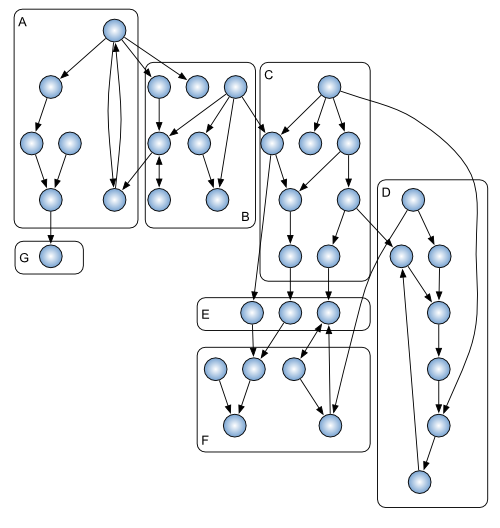
As a quick explanation, an EMF model can be seen as a set of elements referencing each other. This is what we call a "logical model" :
However, these elements are not always living in memory. When they are serialized on disk, they may be saved into a single physical file, or they can be split across multiple files, as long as the references between these files can be resolved :
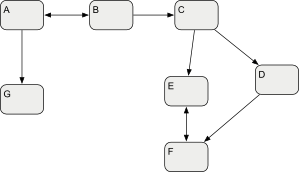
 If we remain at the file level, this logical model can be seen as a set of 7 files :
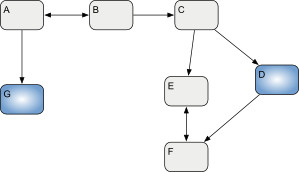
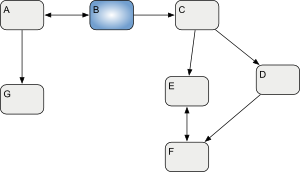
Now let's suppose that we are trying to compare a modified copy (left) of this model with a remote version (right). This requires a three-way comparison of left, right and their common ancestor, origin. That would mean loading all 21 files in memory in order to recompose the logical model. However, suppose that only some of these files really did change (blue-colored hereafter) :
LeftRight
In such a case, what we need to load is actually a small part of the 21 total files. For each three sides of the comparison, we only need to load the ones that can potentially show differences :
Which means that we only need to load 9 out of the 21 files, for 58% less memory than what EMF Compare 1 needed (if we consider all files to be of equal "weight"). Just imagine if the whole logical model was composed of a thousand fragments instead of 7, allowing us to load only 9 files out of the total 3000!

With these enhancements, we decided to run the very same tests as what we did last year with EMF Compare 1.3. Please take a look at my old post for the three sample models' structure and the test modus operandi. I will only paste here as a reminder :

The models' structure :


Small Nominal Large

Fragments 99 399 947

Size on disk (MB) 1.37 8.56 49.9

Packages 97 389 880

Classes 140 578 2,169

Primitive Types 581 5,370 17,152

Data Types 599 5,781 18,637

State Machines 55 209 1,311

States 202 765 10,156

Dependencies 235 2,522 8,681

Transitions 798 3,106 49,805

Operations 1,183 5,903 46,029

Total element count 3,890 24,623 154,820

And the Time and memory used required to compare each of the model sizes with EMF Compare 1.3 :


Small Nominal Large

Time (seconds) 6 22 125

maximum Heap (MB) 555 1,019 2,100

And without further ado, here is how these figures look like with EMF Compare 2.1 :


Small Nominal Large

Time (seconds) 5 13 48

maximum Heap (MB) 262 318 422

In short, EMF Compare now scales much more smoothly than it did with the 1.* stream, and it requires a lot less memory than it previously did. Furthermore, the one remaining time sink are the I/O and model parsing activities. The comparison in itself being reduced to only a few seconds.

For those interested, you can find a much more detailed description of this work and the decomposition of the comparison process on the wiki.

Friday, September 14, 2012

EMF Compare 2 is available

On behalf of the team, I am very proud to announce that the 2.0 release of EMF Compare is now available and can be downloaded from its update site. This release is compatible with Eclipse 3.5, 3.6, 3.7, 3.8 and 4.2.

This new version is an overhaul of the project and as such contains too many enhancements to really list. You can refer to the project plan for an overview of the major themes adressed by this new release, or to my previous post for more information on why we decided to rewrite EMF Compare.

API compatibility between the 1.3 and 2.0 releases is not assured. The new APIs provided with 2.0 were developed in order to be simpler and more intuitive. A migration guide is not yet available, but we will provide all possible help in order to bridge the gap between the two streams' APIs and help users migrate to the new and improved Compare.

Do not hesitate to drop by on the forum for any question regarding this release!

Thursday, August 2, 2012

EMF Compare 2.0 on the launching pad!

This year has been a really important one for us at Obeo to think about our current products and how to improve them. Eclipse Juno was a big investment for us, with a lot of modeling projects in the release train : Acceleo, EMF Compare, EEF, ATL, Mylyn Intent...

EMF Compare is the one that got us thinking the most, and we ended up developping two versions in parallel during the development phase of Juno. First is the version we actually included in the release train, 1.3.1, which is now the maintenance stream.

This version includes a number of new developments and enhancements. Most notably, the detection and merging of differences on values ordering has been greatly improved, and the merging in general was one of our major endeavors this year, fixing thousands of corner cases. Please refer to the release highlights for the noteworthy changes of this version.

However, the 6 years of development spent on EMF Compare allowed us to identify a number of limitations in the architecture and overall design of the project, most of which cannot be worked around or re-designed without breaking the core of the comparison engine. We needed a complete overhaul of the project, and thus the second version we've been developping through the past year is the 2.0.0.

Version 2 has been started as part of the work sponsored in the context of the Modeling Platform Working Group. Its two main objectives are to :
  • lift the architectural and technical limitations of EMF Compare so that we can reduce its memory footprint while improving its overall performance, and
  • simplify the API we offer to our adopters so that launching comparisons or exploiting the difference model can be done more effectively.
We're also taking this opportunity to further our integration with the "standard" Eclipse Compare UI, making sure to use the Eclipse Compare UI everywhere we can. This means that the icon decorators will now properly show exactly as they would with text comparisons, the behavior when switching viewers on selection is now closer to what Eclipse Compare does...

Version 2.0.0 of EMF Compare will be out in the first half of august. It focuses on the comparison of models presenting IDs of some sort (XMI ID, technical ID, ...). The design and architecture have both been remasterized with all the experience accumulated on the 1.* stream, greatly improving the user experience, performance, memory footprint and reusability of the tool. We've submitted a talk for Eclipse con Europe 2012 focussing on the intended improvements of this version. Do not hesitate to comment there if you're interested in it!

Version 2.1.0 is scheduled shortly after that, sometime during september. That new version will leverage the new architecture to provide the scalability improvements mandatory for very large model comparisons. In short, EMF Compare will be able to function with time and memory footprints dependent on the number of actual differences instead of being dependent on the input models' size.

Friday, January 20, 2012

Traceability test case : UML to Java generation

The next version of Acceleo will introduce a number of improvements of its existing features, one of its most important, the automatic builder, being entirely re-written in order to get rid of legacy code and improve the user experience. This also comes with a much better experience for users that need to build their Acceleo generators in standalone, through maven or tycho. More news on this are available on the bugzilla and Stephane's latest post.

One of the least visible features, yet one I find among the most interesting aspects of the Acceleo code generator, is the traceability between the generated code, the model used as input of the generation, and the generator itself. Basically, you always know where that esoteric line of code came from : which part of the generation template generated it, and which model element triggered its generation.

This feature has known a series of improvements as we used it intensively with the UML to java generator. We are now confident that we can record and display accurate information even for some of the most complex use cases. This generator isn't the most complex generator we could write with Acceleo, but it is quite complete nonetheless. Here are some examples of what the Traceability can provide to architects developping their code generators :

Determine which model element triggered the generation of a line of code


On the left-hand side, a file that has been generated. On the right-hand side, an editor opened as result of using the action "open input" : the model is opened and the exact element that was used to generate the part of code is selected.

Find the part of a generator that created a given part of the code

On the left-hand side, the same generated file as above. On the right-hand side, the result of using the "open generator" action : the Acceleo generator which generated that selected part of the code is opened, with the exact source expression selected.

Real-time Synchronization


These are but a few of the features that can be derived from the synchronization between code, model, and generators. Some more examples include : previewing the result of a re-generation, incremental generation, round-trip (updating the input model according to manual changes in the output generated code)...

Most of these features are better seen in video to get an idea. If you want to see some of them in action, some more flash videos of what traceability can do for you are available on the Obeo network (though a free registration is required).

Thursday, October 27, 2011

EMF Compare scalability

During the sponsored work on EMF Compare, we have taken some time to measure the performance of EMF Compare and think about possible improvement axis. We meant to profile both the time needed to compare two models and the overall memory footprint of a comparison, this has been achieved through the use of the Yourkit Java profiler.

The first measures we took highlighted such a huge kludge that we took the time to better the comparison algorithms before taking any further action. Through the use of google's Guava and some rethinking, we improved the comparison time on big model comparison a great deal, dividing the total comparison time in half!

Here is a sample of the time it takes now to compare your models with the latest builds of EMF Compare :

Structure of the sample models used in these tests ("fragments" are the number of fragmented files, the rest are UML model elements contained by the samples) :


Small Nominal Large

Fragments 99 399 947

Packages 97 389 880

Classes 140 578 2169

Primitive Types 581 5370 17152

Data Types 599 5781 18637

State Machines 55 209 1311

States 202 765 10156

Dependencies 235 2522 8681

Transitions 798 3106 49805

Operations 1183 5903 46029

Time and memory used required to compare each of the model sizes (the model is copied, randomly modified, then the copy is compared with its original) :


Small Nominal Large

Time (seconds) 6 22 125

maximum Heap (Mo) 555 1019 2100

We initially thought that the time was mostly spent matching the elements together. It turns out that the real bottleneck of a comparison is the differencing phase (we know the two elements "match", now we need to know if, and how they differ). Just goes to show you that a profiler is mandatory in order to really know why your product might be slow ;).

Future development

These profiling sessions made clear the problems of EMF Compare on large models. We can properly handle "medium" models : EMF Compare is fast and its GUI can react at reasonable speed. However we cannot scale this behavior to large models : memory management is somewhat inefficient (more than 2Go of heap space to compare two models that both "weigh" 50Mo on disk...), the GUI is sluggish... We did isolate a number of potential improvements though. Stay tuned!

Note : the report is online and can be retrieved from here for those interested.

Wednesday, September 28, 2011

The dynamic interpreter, your code generation companion

The latest stable release of Acceleo, version 3.1.1 included in Indigo SR1, is fresh from the oven; but development on the next version is already well underway. The upcoming version 3.2 already includes major improvements of the tooling performance (compilation time, completion proposal computation, memory management...), making the everyday use of the Acceleo editor much more appealing; and some of the planned features for this version are already in their finalization stage.

The one feature I'll linger on here is the dynamic interpreter for Acceleo and OCL expressions that we implemented for this version. Typically, you develop your code generators within the Acceleo editor, making use of the advanced edition features such as completion proposals, live compilation and syntax error reporting, syntax highlighting ...

However the editor itself cannot help you determine what a given expression will return as its result. When you are in the middle of a complex OCL expression, it is sometimes difficult to say "this expression will output that classifier". And here is where the live interpreter comes into play!


The image above displays the "interpreter" view and the use we can make of it : We opened the UML metamodel and selected "Class" in it. This makes "Class" the context of any evaluation entered in the interpreter (that would work with anything that can be adapted to an EMF object : selection in a model editor, selection in a graphical editor (GMF, Obeo Designer... even the "variable" view when debugging Acceleo generations!). We entered an expression... and the view made the rest, evaluating that expression on-the fly and displaying its result (here, all of the super-types of the UML "Class").

Using the Interpreter during debug

The Interpreter can be used as is, defining your own variables as you need them and entering the expression manually... but it can also be used in conjunction with the debugger. For example, let's say I want to know what happens within the 'UML 2 Java' example that is provided with Acceleo.
  • I open the "classBody" module of that example, and set a breakpoint somewhere within the "generateClassBody" template :
  • Then, run the example in debug mode until the breakpoint is hit :
  • And from there, I can either copy/paste whole expressions in the interpreter :
  • Or "link" the interpreter with the current module context...
  • And directly call its templates :
  • Of course, the result of this last action is lengthier than a single line, double clicking the result will open a popup in which it will be more readable :

The view features a number of possibilities, creating and assigning variables to be used in the expression, real-time evaluation, linking with an Acceleo editor's context, saving the expression as a new query or template in a given Acceleo module... The view itself can be used without Acceleo, and accepts any other languages through extension points. I can't detail all of its features and extension possibilities here, see the wiki page for more (still a work in progress, yet it does describe the view in little more details than here) :).

Tuesday, August 9, 2011

EMF Compare - giant steps towards a working merger

EMF Compare, or how to provide meaningful comparison algorithms and visualization for models. Comparing the models' XMI serializations as text is a chore that we should never have to go back to, and EMF Compare has always strived at doing the best possible job towards that end.

Who would rather compare their models textually :


Than compare them logically (yes, these are the same models as above) :


However, EMF Compare still had issues with most algorithm : small errors when matching elements together, differences that weren't detected ... and worst of all : merging all diffs from one side to the other rarely gave the expected result of "two identical models", i.e : if the comparison process in itself was working fairly well, we had a huge number of failures when merging.

We've decided to tackle this problem the way we should have from the very start : list all potential differences that can be observed between two models ... and create the corresponding unit test!

The results are already showing. True, we are still missing a number of unit tests in order to test all potential use cases we can list ... but we've already fixed an incredible number of bugs be they known (half of our opened bugs, forty-ish out of eighty or so) or bugs we had never detected before. The number of unit tests talks for itself :

That's 4000 unit tests and as many different combinations of differences added and fixed in the past weeks.

I won't lie, some of these tests are redundant because of the way we decided to work : we are not trying to cover code, but rather cover use cases; which means some of these tests overlap with others. This does mean, however, that we are fairly sure we'll never have regressions on things that are tested :).

And now, back to the last few tests we are still missing!